

Our editorial team is comprised of skilled technology experts and developers. To ensure that our research is easy to understand in simple and plain English, we may use AI-assisted tools for grammatical refinement and structural smoothness. However, every technical insight, test, and experience displayed has been fully completed and verified by our human team. All content remains the original property of Droid Expose. See more in our Privacy Policy.
WhatsApp is officially testing a new paid tier called WhatsApp Plus. This optional subscription offers users a way to customize their experience with exclusive cosmetic features and quality of life improvements.
While the core messaging service remains free for everyone, WhatsApp Plus is designed for power users who want more control over how the app looks and feels.
Table of Contents
What Do You Get with WhatsApp Plus?
Most of the new features are focused on personalization. For a monthly fee, subscribers gain access to:
- Enhanced Chat Pinning: Instead of the standard limit of 3 pinned chats, users can now pin up to 20 important conversations to the top of their list.
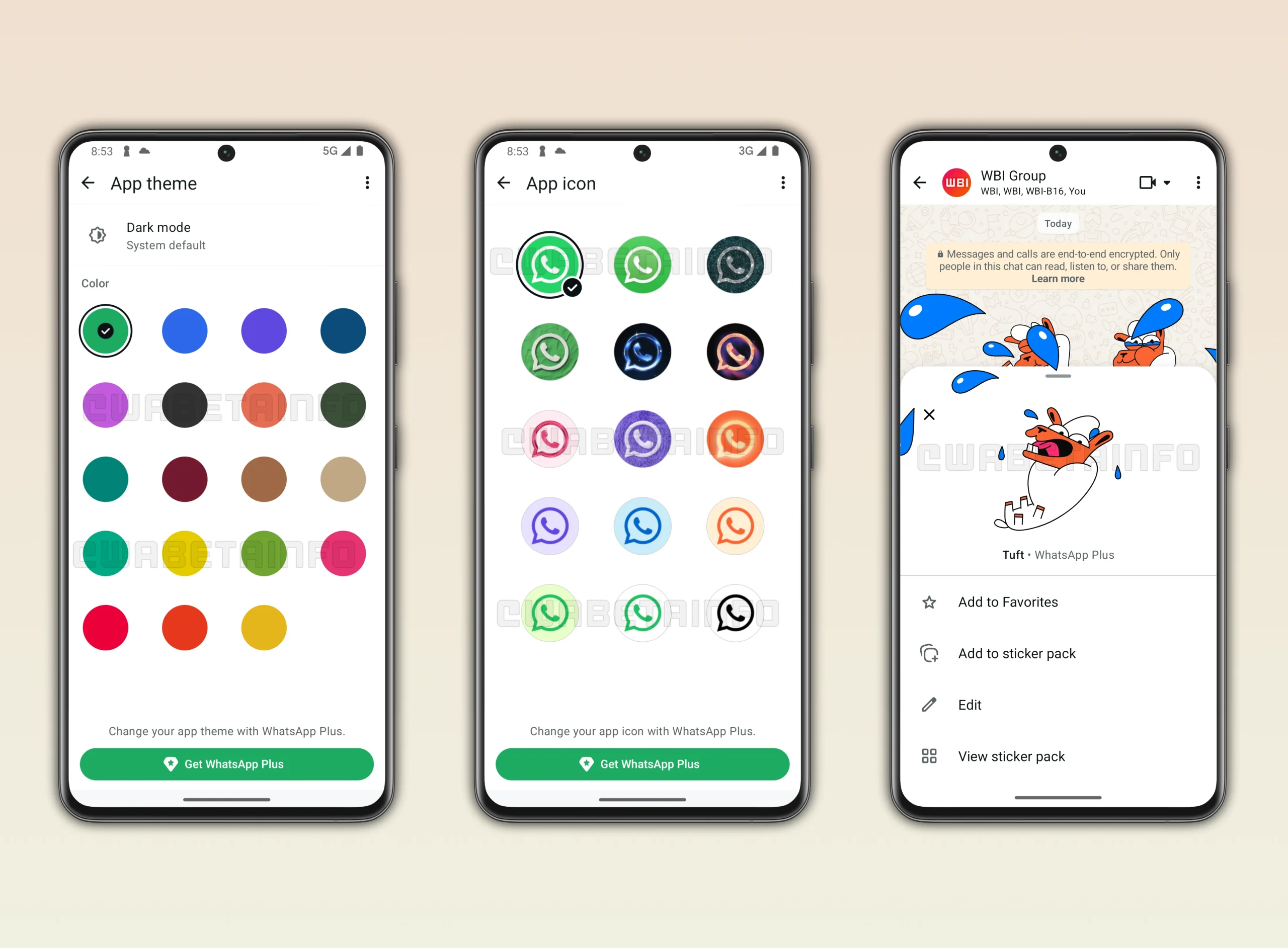
- Exclusive Customization: Subscribers can choose from 18 new color themes and 14 different app icons to change the look of the software on their home screen.
- Premium Media: Access to special animated stickers that can expand across the entire screen and exclusive premium ringtones for calls.
- Bulk Settings: The ability to apply custom notification tones and themes to entire lists of chats all at once.
Pricing and Availability
The subscription is currently in a limited early test phase.
- Cost: Pricing is expected to be around $2.50 per month (or €2.49 in Europe), which is slightly cheaper than similar services like Snapchat+.
- Platform: For now, the test is focused on Android users using the standard WhatsApp Messenger app. Support for iOS (iPhone) is planned for a later date.
- Business Use: WhatsApp Plus is currently not available for the WhatsApp Business app.
Other Major Updates in Testing
Beyond the paid subscription, WhatsApp is working on several new features that will likely roll out to all users soon:
- Notification Bubbles: A new Android feature that lets chats float on top of other apps, making it easier to reply without switching screens.
- AI Chat Summaries: A tool for iPhone users that uses Private Processing to create a short summary of all your unread messages so you can catch up quickly.
- Easy Business Blocking: A new button directly in the chat interface to stop marketing messages and offers from businesses without having to open the Block menu.
- Channel Statuses: Channel admins will soon be able to post temporary status updates (disappearing after 24 hours) to share quick announcements with their followers.
How to Subscribe and Manage WhatsApp Plus
If you want to try out these premium features, the process is straightforward and handled directly within the app. Here is how to get started:
- To Subscribe: Open your WhatsApp Settings and look for a new menu labeled Subscriptions. Tap on WhatsApp Plus (if you don’t see this, the feature hasn’t reached your account yet). Tap Continue, review the pricing, and confirm your purchase. On iPhone, payments are processed through the Apple App Store, while Android users will use the Google Play Store. You will receive a confirmation notification once your account is active.
- To Manage Benefits: Once you are a subscriber, you can view and activate your perks by going to Settings > Subscriptions > WhatsApp Plus. From there, you will see a full list of available benefits—simply tap on any feature, such as custom themes or expanded pinning, to start personalizing your app.
Is WhatsApp No Longer Free?
No. Meta has confirmed that the essential messaging features will always stay free. WhatsApp Plus is strictly an add-on for those who want extra cosmetic perks. This move follows Meta’s successful launch of Instagram Plus earlier this year as the company looks for new ways to generate revenue beyond ads.