

Close Menu

    Subscribe to Updates

    Get the latest creative tech news from Droid Expose about AI, Apps and Devices.

    What's Hot

    iOS 27 Everything You Need to Know: What Apple Confirmed, What We Got Wrong, and What It Means for Your iPhone

    June 12, 2026

    I Got a Privacy Email From Google Last Night and It Was Actually Worth Reading

    June 10, 2026

    Samsung’s Galaxy S25 Is Already Getting One UI 9 Testing and It’s Earlier Than Anyone Expected

    June 8, 2026
    Facebook X (Twitter) Instagram YouTube
    Facebook X (Twitter) Instagram YouTube
    Droid ExposeDroid Expose
    • AI

      I Tested Gemini 3.5 Flash Against Gemini 3 Flash Across 5 Real Challenges- Here’s What Actually Surprised Me

      May 30, 2026

      Apple’s Best Use of AI Yet Has Nothing to Do With Chatbots

      May 22, 2026

      Gemini 3.5 Flash Explained: Everything You Need to Know About Google’s Most Capable Fast Model

      May 21, 2026

      Google I/O 2026: Gemini 3.5 Flash, Our SynthID Experiment and More AI Announcements

      May 21, 2026

      Google Introduces Gemini Omni: A New Era for Conversational Video Editing

      May 20, 2026
    • Software

      iOS 27 Everything You Need to Know: What Apple Confirmed, What We Got Wrong, and What It Means for Your iPhone

      June 12, 2026

      Samsung’s Galaxy S25 Is Already Getting One UI 9 Testing and It’s Earlier Than Anyone Expected

      June 8, 2026

      We’ve Been Testing Android 17 Betas Since February and Here’s What Beta 4.1 Fixed

      June 6, 2026

      Meta Now Wants You to Pay for Instagram, Facebook, and WhatsApp- Here’s Why That Actually Makes Sense

      May 27, 2026

      I Used Instagram Instants Without the Dedicated App And Here’s What Disturbed Me

      May 23, 2026
    • Features

      I Got a Privacy Email From Google Last Night and It Was Actually Worth Reading

      June 10, 2026

      We’ve Been Testing Android 17 Betas Since February and Here’s What Beta 4.1 Fixed

      June 6, 2026

      Xiaomi Just Made One of the Most Annoying Android to iPhone Problems Easier to Deal With

      June 4, 2026

      Meta Now Wants You to Pay for Instagram, Facebook, and WhatsApp- Here’s Why That Actually Makes Sense

      May 27, 2026

      Apple’s Best Use of AI Yet Has Nothing to Do With Chatbots

      May 22, 2026
    • Security

      WhatsApp Is Testing After Reading Disappearing Messages on iPhone

      May 18, 2026

      After 3 Years I Found SimpMusic as a Spotify Alternative — But Here Is the Reality

      May 17, 2026

      Android and iPhone Users Finally Get End-to-End Encrypted RCS Messaging

      May 12, 2026

      Meta Ends End-to-End Encryption for Instagram DMs

      May 9, 2026

      Meta’s New AI Scans Bone Structure to Spot Underage Users

      May 5, 2026
    • News

      Samsung Is Reportedly Launching Three Foldables in July and the One Nobody Expected Is the Most Interesting

      June 1, 2026

      Meta Is Building an AI Pendant, More Smart Glasses, and a Wearables for Work Plan

      May 31, 2026

      Google I/O 2026: Gemini 3.5 Flash, Our SynthID Experiment and More AI Announcements

      May 21, 2026

      Malta Partners with OpenAI to Provide Free ChatGPT Plus to Every Citizen

      May 17, 2026

      Google might drop your free 15GB storage to 5GB if you aren’t verified

      May 15, 2026
    Droid ExposeDroid Expose
    Home - I Used Instagram Instants Without the Dedicated App And Here’s What Disturbed Me
    Guides

    I Used Instagram Instants Without the Dedicated App And Here’s What Disturbed Me

    Tawsif RezaBy Tawsif RezaMay 23, 2026Updated:May 23, 2026No Comments5 Mins Read
    Facebook Twitter Email WhatsApp Copy Link
    Instagram Instants
    Share
    Facebook Twitter LinkedIn Email WhatsApp Copy Link

    Our editorial team is comprised of skilled technology experts and developers. To ensure that our research is easy to understand in simple and plain English, we may use AI-assisted tools for grammatical refinement and structural smoothness. However, every technical insight, test, and experience displayed has been fully completed and verified by our human team. All content remains the original property of Droid Expose. See more in our Privacy Policy.

    Instagram has a photo-sharing feature that most users stumble into rather than choose. It is called Instants, and after spending time with it, I have a few things worth sharing especially for anyone who has not fully figured out how it works yet.

    Table of Contents

    • What Is Instagram Instants?
    • A large majority of My Friends Instants Were Accidental
    • I Tested It and Here Is Exactly What Happens
    • Finding Your Own Instants Is Not Obvious
    • Most People Do Not Even Know There Was a Separate App
    • What Works Well
    • The Simple Fix Instagram Needs

    What Is Instagram Instants?

    Instants is Instagram’s version of spontaneous, unfiltered photo sharing which operates on a “View Once” basis. The idea is similar to BeReal: snap a photo, send it to close friends, no editing, no pressure. It lives inside your Instagram inbox as a small stack of photos in the bottom right corner of the screen.
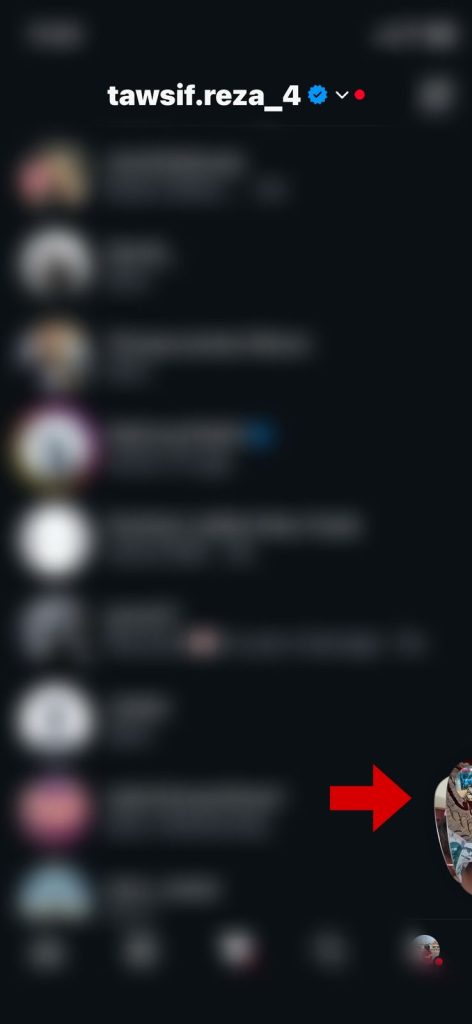
    Instagram Instant in App inbox
    A small stack of photos hiding partially in the Instagram Inbox’s bottom right corner and it is the Instants

    The catch is how it works when you tap it.

    A large majority of My Friends Instants Were Accidental

    Scrolling through my friends’ Instants, the pattern was hard to miss. Blurry shots, dark photos, partial faces, pictures clearly taken while the phone was still moving. Most of what I saw looked unintentional- not casual, just accidental.

    At first I assumed people were just being spontaneous. But the more I looked, the more it became clear that most of them probably did not know they had posted anything at all.

    I wanted to attach the accidental photos here with permission, but Instagram blocked screenshots of Instant photos because it was under “View Once” feature.

    I Tested It and Here Is Exactly What Happens

    Look at the video exactly, the shot of Instants was shared as soon as I tapped the capture button.

    I went into the Instants section, tapped on the capture button, and it posted immediately. No preview screen. No confirmation prompt. No share button. Just posted.

    For comparison, Instagram Stories shows you a full preview before anything goes live. Snapchat does the same. Instants skips that step entirely. Tap a photo, it goes to your friends. That is the full flow.

    This is not a glitch. It is how the feature was designed so people would stop overthinking what they share. The intention makes sense. But in practice, it means a lot of people are posting photos they never meant to send.

    Finding Your Own Instants Is Not Obvious

    If you want to check what you have already posted, it is not where you might expect it. There is no link from your profile, and nothing in your notification history points back to it until someone reacts or replies to it.

    Here is how to find it:
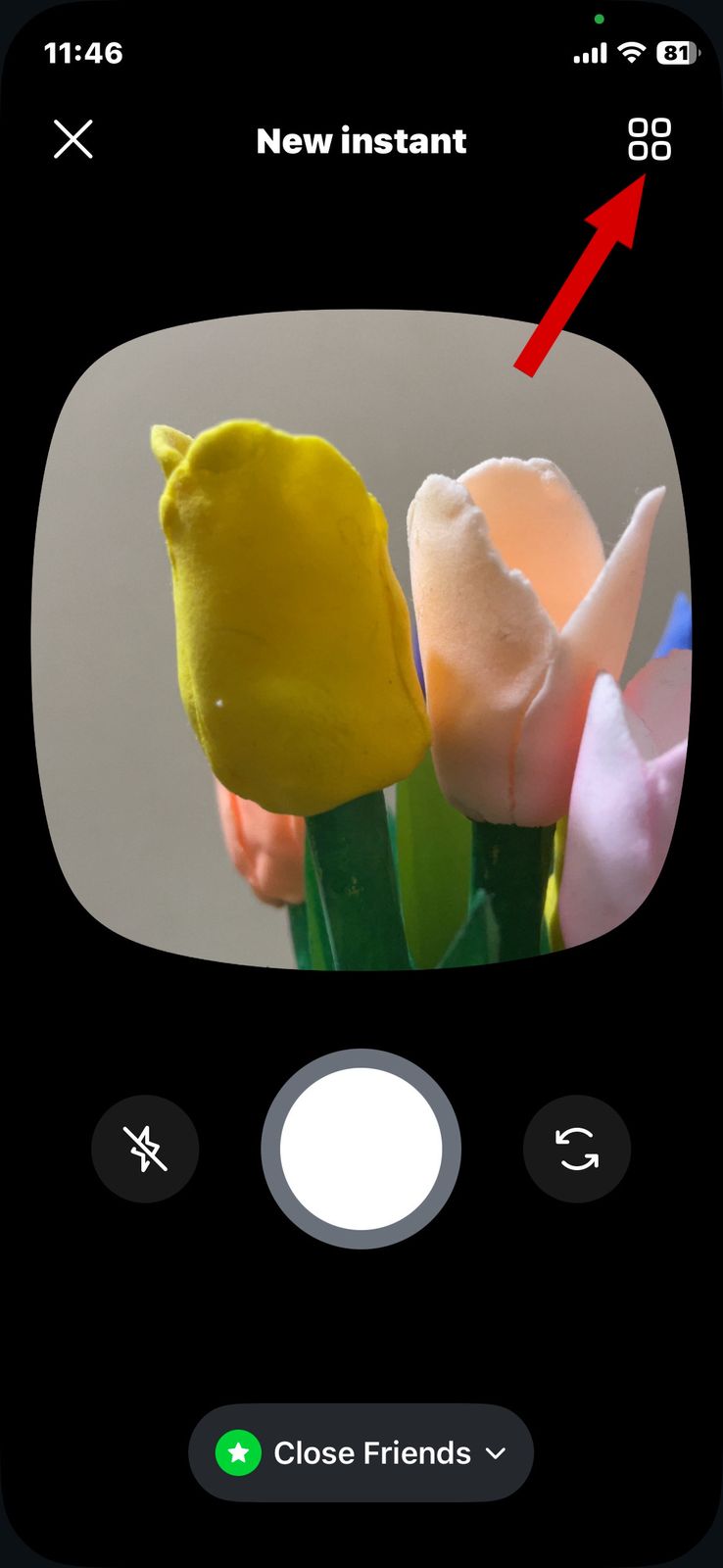
    Instagram Instants Archive symbol
    There is a button of Archive in upper right corner in Instants
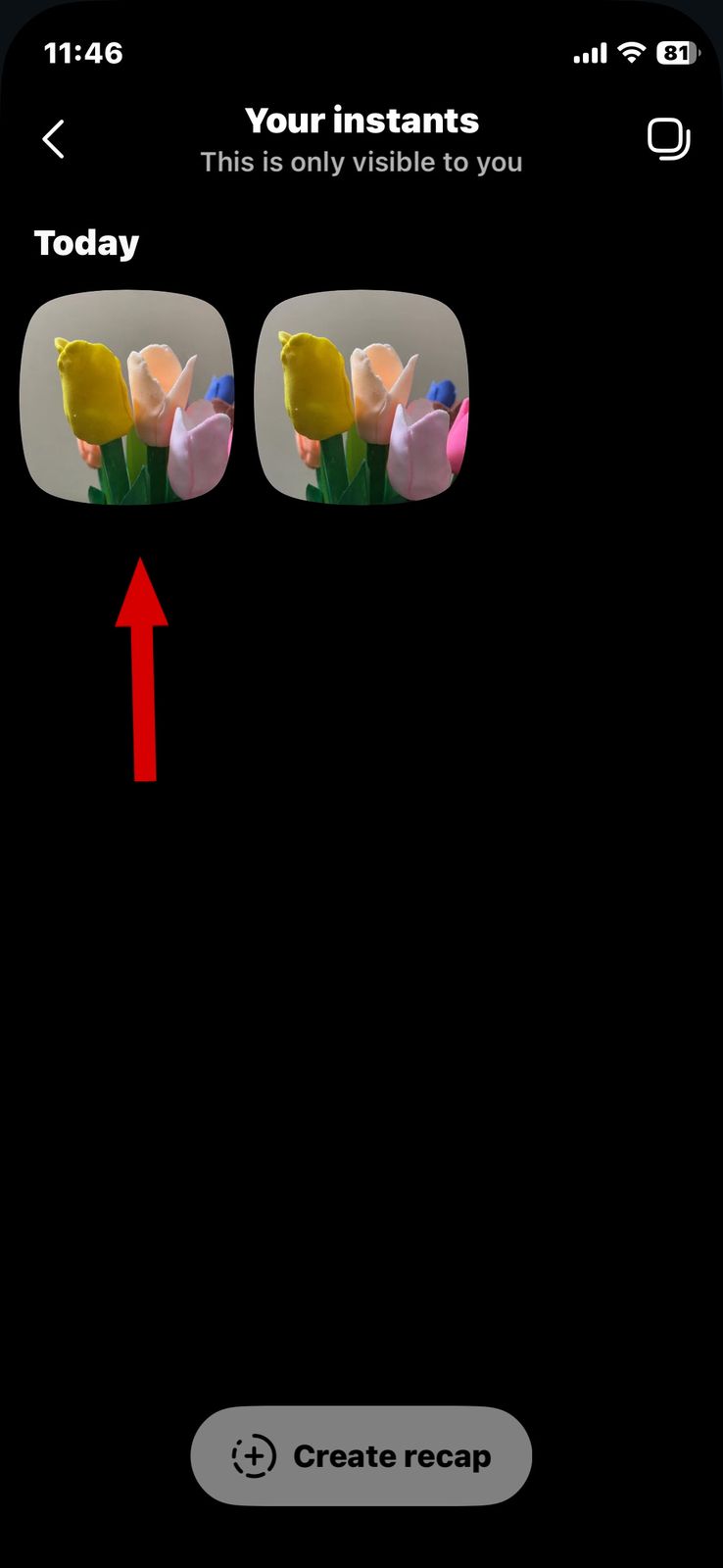
    Instagram Instants Archive page
    The Archive page stores your all Instants
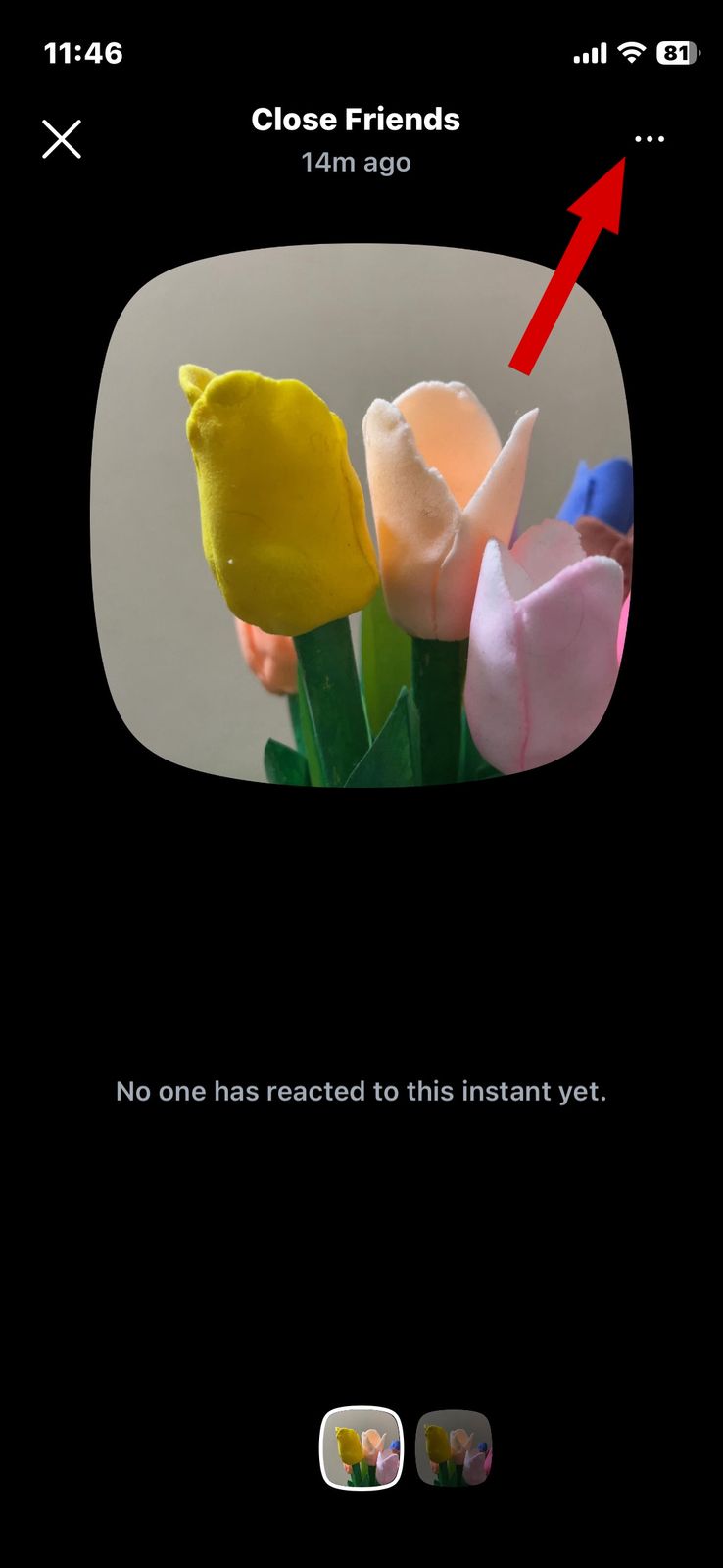
    Instagram Instant three-dot-menu
    A three-dot-menu in each archived Instant
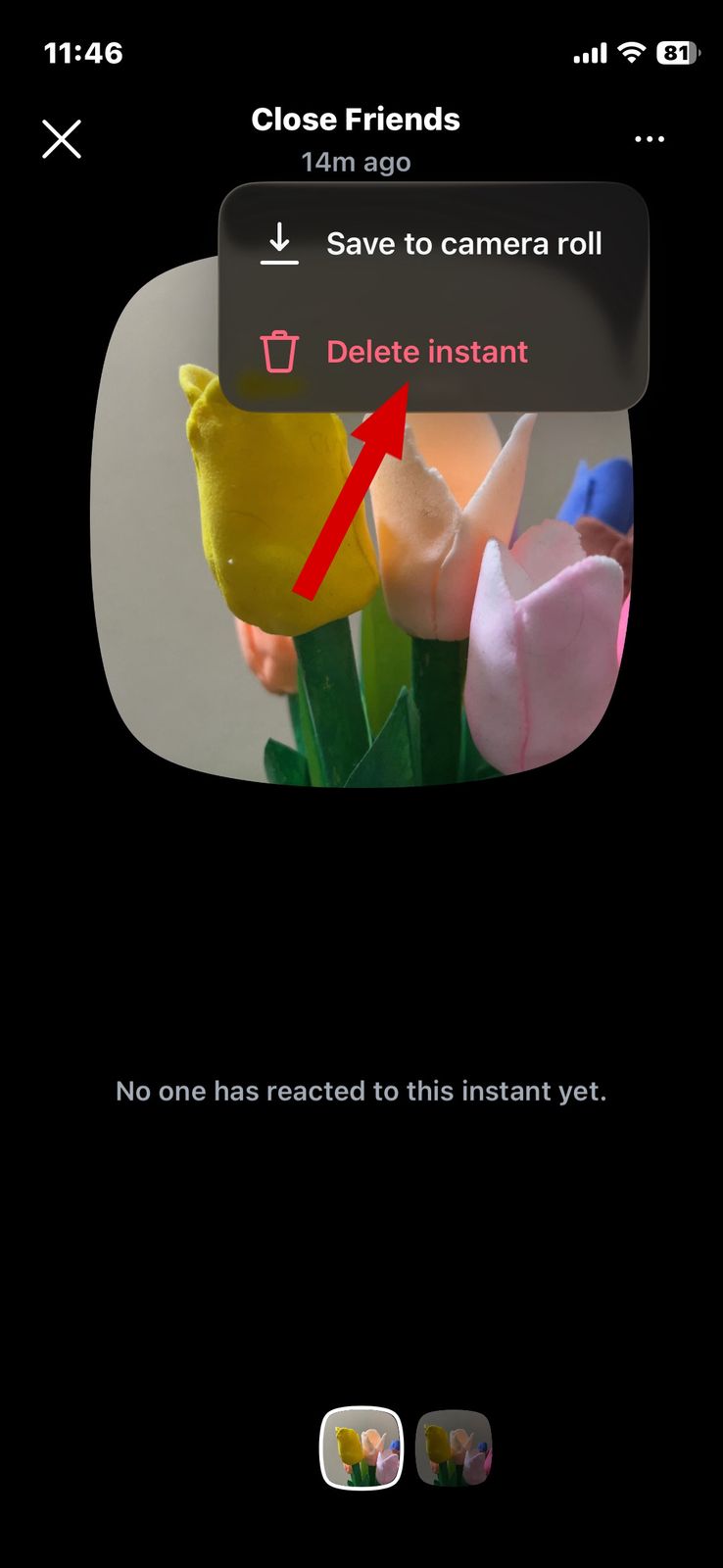
    Deleting Instagram Instant
    “Delete instant” option after clicking on three dots menu

    Instagram does let you review and delete old Instants, although the option is surprisingly hidden. You need to open the small photo stack icon inside your inbox, head into the Archive section in the top corner, and then open the three-dot menu on any Instant to delete it.
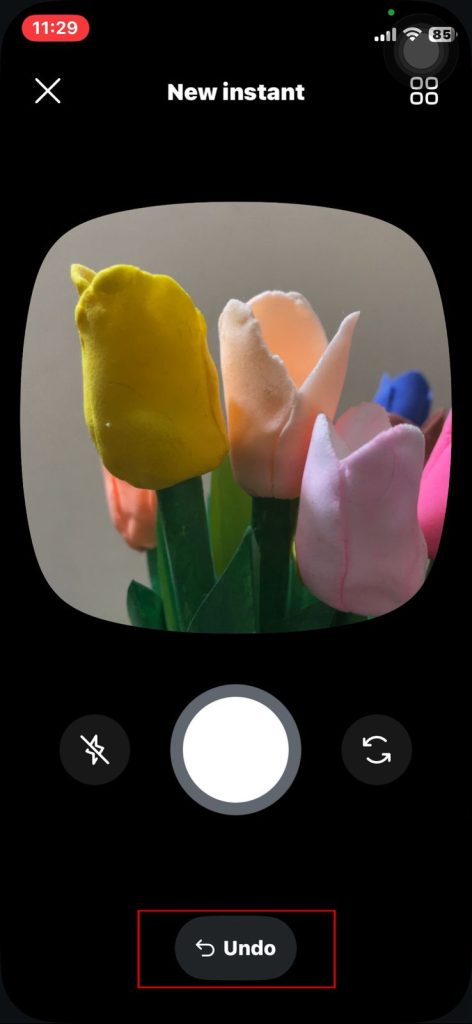
    Instagram instant Undo option
    A “Undo” button appears after capturing an Instant

    There is also a small “Undo” option that briefly appears after taking a photo. It works, but the problem is that most people will not notice it quickly enough the first time they use the feature.

    It works fine once you know it is there. But for new users, finding it is not intuitive, and if you have posted something by mistake, the path to delete it is not immediately obvious.

    Most People Do Not Even Know There Was a Separate App

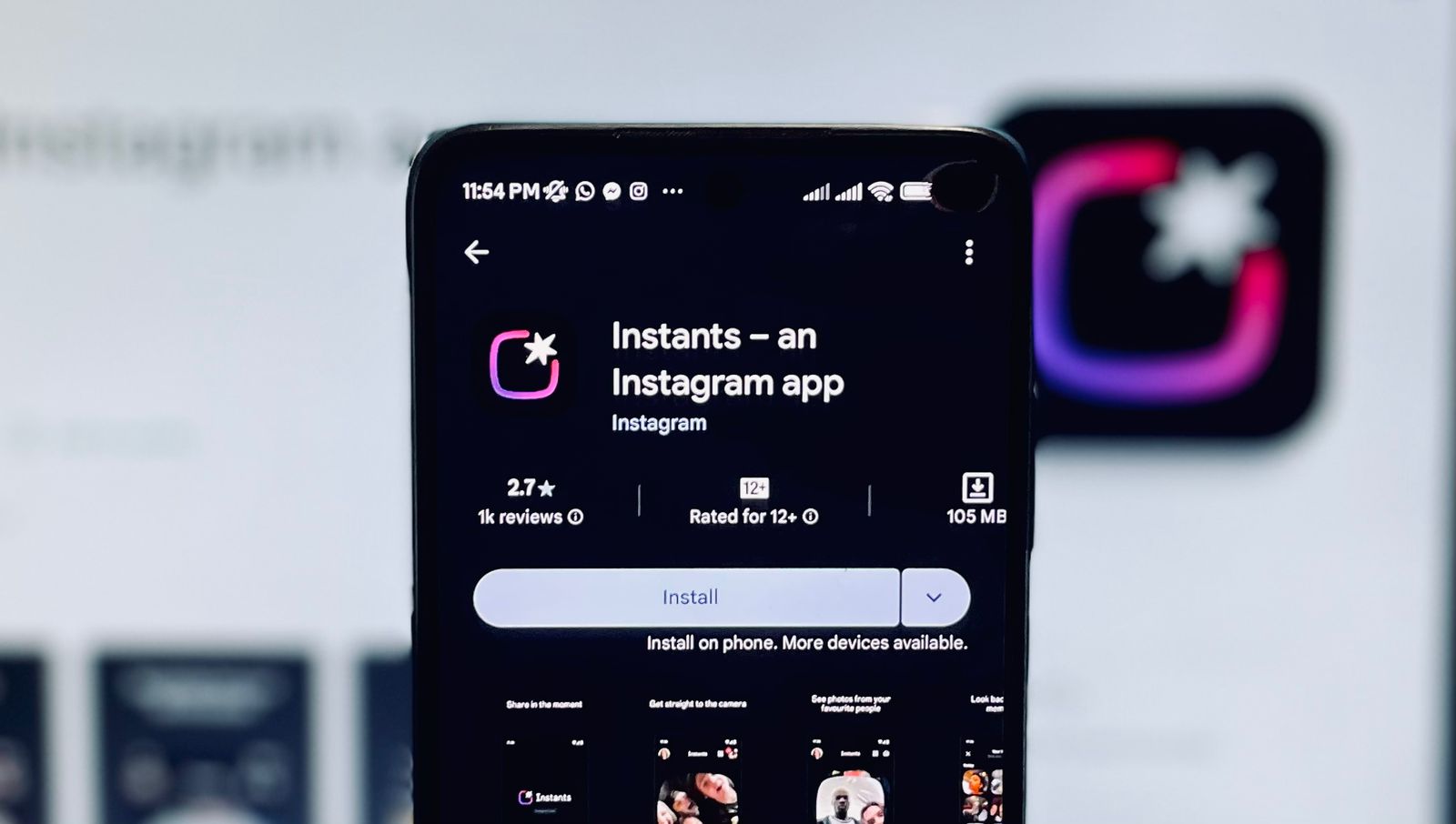
    A large number of Instagram users have no idea that Instants was ever a standalone app and the app is available on both the Apple App Store and the Google Play Store. For most people, it simply appeared one day inside their existing Instagram inbox- no download, no setup, no explanation. But a feature breakdown appears after the update arrives in each user account. The settings and features are nearly identical. Whether you use the Instants feature in the main Instagram app or the standalone Instants app, they sync to the same account and share the same core functionality.

    What Works Well

    To be fair, Instants does have genuine appeal for the right users.

    People who use it intentionally enjoy the low-pressure format. No grid to maintain, no aesthetic to keep up just a quick photo shared with friends and gone from their view in 24 hours. For that use case, it works well.

    The private archive is also a nice touch. Your Instants stay saved on your end for a full year even after disappearing for viewers, which turns it into a quiet, unedited photo diary.

    The Simple Fix Instagram Needs
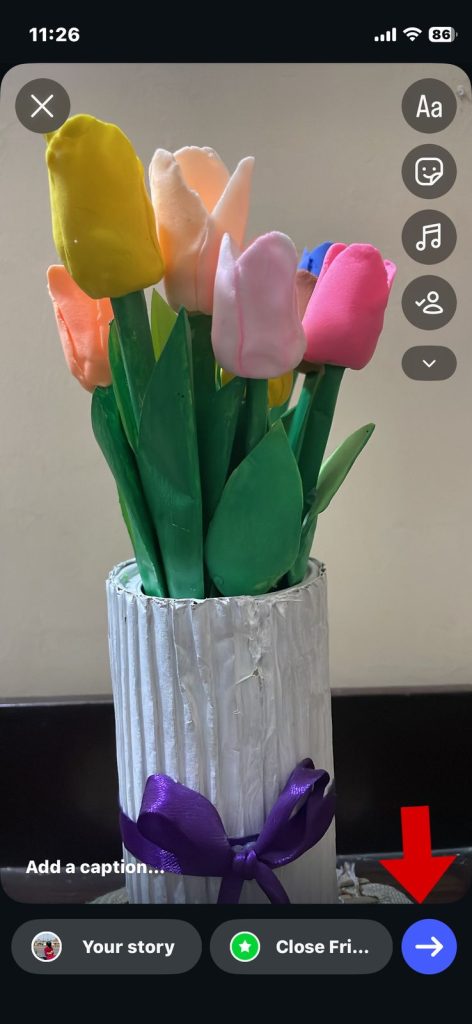
    Instagram Story upload feature
    Before sharing a story on Instagram, there is an option to upload or discard it, and that’s what I love.

    A basic preview screen before posting like every other sharing feature already has would solve most of the complaints. Just a photo preview and a send button. That is all it would take to stop the flood of accidental posts.

    Making the archive easier to find would also help, especially for users who are not already comfortable navigating Instagram’s deeper menus.

    Instagram Instants is a reasonable idea with one significant flaw: it posts without asking you first. Until that changes, the easiest advice is to know where that photo stack icon is and be deliberate before tapping anything near it. As the update arrives, it introduces new features to every user, which makes it worth understanding before you start tapping around.

    how Instagram Instants works how to delete Instagram Instant Instagram Instants Instagram Instants accidental post Instagram Instants settings
    Share. Facebook Twitter LinkedIn Email Copy Link

    Related Articles

    iOS 27 Everything You Need to Know: What Apple Confirmed, What We Got Wrong, and What It Means for Your iPhone

    June 12, 2026

    I Got a Privacy Email From Google Last Night and It Was Actually Worth Reading

    June 10, 2026

    Samsung’s Galaxy S25 Is Already Getting One UI 9 Testing and It’s Earlier Than Anyone Expected

    June 8, 2026
    Add A Comment
    Leave A Reply Cancel Reply

    Droid Selections

    Xiaomi 17T and 17T Pro Are Here- But That Price Jump Is Hard to Ignore

    May 28, 2026

    Android 17 adds Proactive AI, Quantum Security, and a War on Doomscrolling

    May 14, 2026

    Samsung’s Galaxy S25 Is Already Getting One UI 9 Testing and It’s Earlier Than Anyone Expected

    June 8, 2026

    Meta Is Building an AI Pendant, More Smart Glasses, and a Wearables for Work Plan

    May 31, 2026
    Our Reviews

    I Got a Privacy Email From Google Last Night and It Was Actually Worth Reading

    By Tawsif Reza

    I Was Using Windows 10 on My Old Intel Celeron N2815 and the System Lag Forced Me to Find an Ultra-Lightweight OS

    By Tawsif Reza

    I Tested Gemini 3.5 Flash Against Gemini 3 Flash Across 5 Real Challenges- Here’s What Actually Surprised Me

    By Tawsif Reza
    Droid Expose
    Facebook X (Twitter) Instagram Pinterest YouTube Telegram
    • About Us
    • Contact Us
    • Terms Of Use
    • Editorial Policy
    • Privacy Policy
    © 2026 Droid Expose. Powered by Droid Expose.

    Type above and press Enter to search. Press Esc to cancel.